I Tried to Free Up Space on my Mac. Instead, I Ran Malware.
How a fake Apple support page appeared first in my Google search results, tricked me into running information-stealing malware, and taught me a lesson I won't forget.
 Pedro Trindade
Technology & Cybersecurity · 8 min read ·
It was almost midnight
On 12 October 2026, I was trying to free up storage on my MacBook Air. It was almost midnight. I was tired and wanted to finish and go to bed.
The first Google result looked like an Apple support page. The address included Apple's name, the page was in Portuguese, and it seemed to answer exactly what I needed.
So I clicked.
The address was apple-free-up-storage[.]com/pt-pt/102624. It wasn't an Apple support domain, but the page copied Apple's navigation, typography and support-page layout.
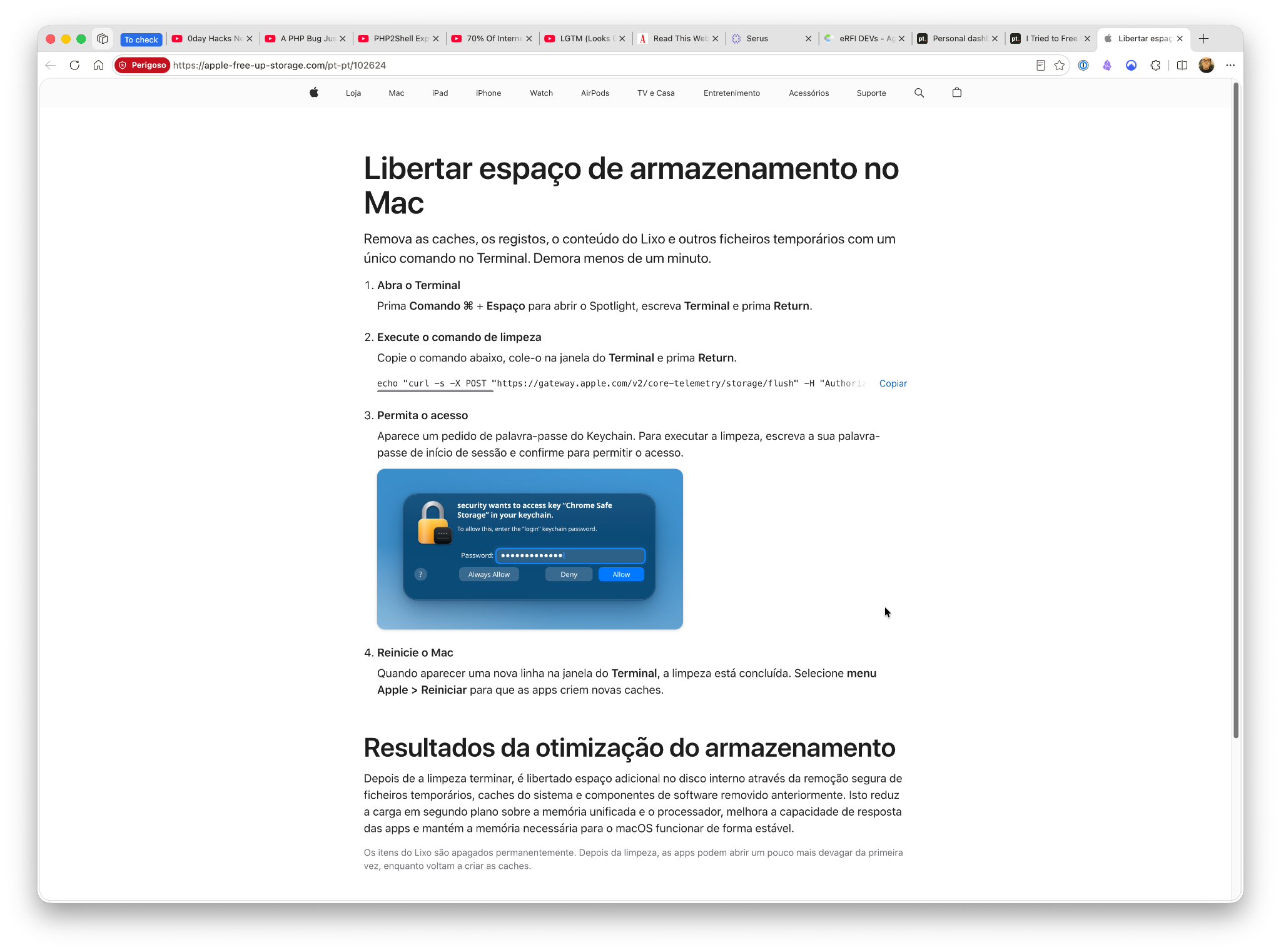
Screenshot from 26 October. The browser's “Perigoso” (“Dangerous”) warning was not present when I first visited on 12 October.
The website suggested a Terminal command to clean up storage. I'm a software engineer. I use Terminal regularly and know the risks of running commands from unknown sources.
But that night, I trusted the first result and ran the command without properly reading it. I knew better; I was simply tired and rushing.
Almost immediately, a password dialog appeared, claiming to be from System Preferences. It looked similar to a genuine macOS prompt, but not quite right. I knew I'd made a mistake.
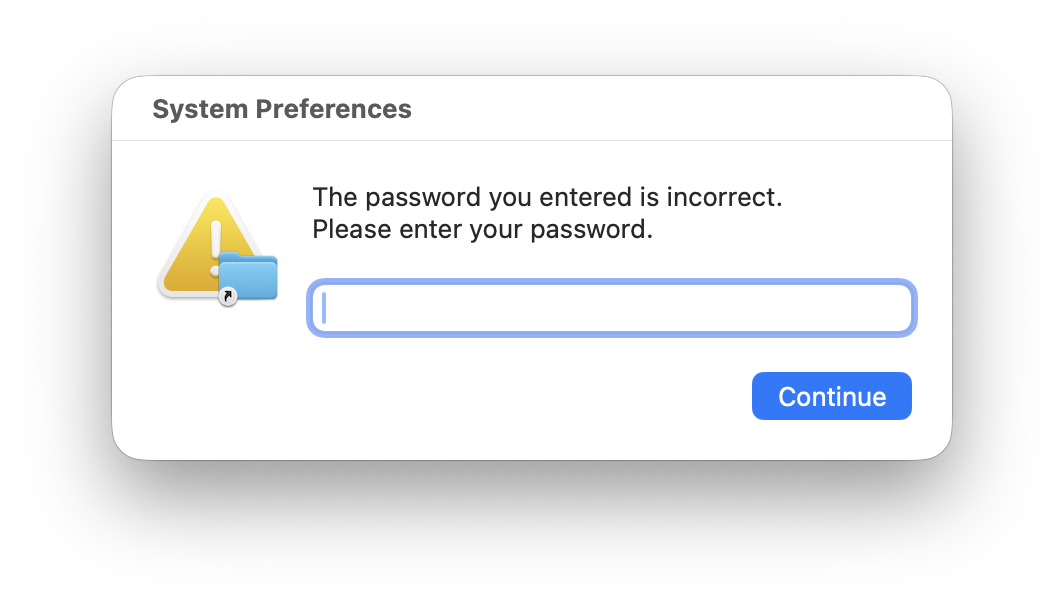
The password prompt that made me realise something was wrong.
I immediately disconnected the MacBook Air from the internet. I deliberately entered a wrong password, hoping it might help interrupt the attack, then examined what I'd executed.
It had downloaded and run information-stealing malware. Some of my files had already been collected.
macOS also reported blocking an attempted action. I couldn't establish exactly what it stopped or whether that prevented an upload. The collected files showed that at least some malware activity had succeeded.
What was hidden in that command?
The instruction began with an Apple-looking storage-cleanup request, including an AppleToken header. But it was inside an echo: it only printed that text, rather than contacting Apple.
The real instructions were hidden in Base64, a way of representing text that's easy to decode but awkward to read at a glance. They downloaded another script and passed it to zsh, which executes shell commands.
Do not run the original command. This sanitised excerpt has the encoded payload and token-like text removed:
echo "<Apple-looking cleanup text>" && echo "<encoded payload removed>" | base64 -D | zsh
Think of a parcel with an official-looking Apple label and completely different contents inside. The attackers needed me to run their command.
And I did.
What the malware collected
Checking recently created files, I found /private/tmp/77167/FileGrabber/. It contained copies of an SSH private key, SSH and Docker configuration, shell history and settings.
There was also a hidden ZIP archive of around 16 KB, with directories named for password managers, messaging apps, cryptocurrency wallets and cloud credentials. Some appeared empty: a directory named “1Password” or “Bitwarden” doesn't prove data was obtained from that application.
I use 1Password for passwords, one-time authentication codes, passkeys for passwordless sign-in, and other confidential information. I hope this limited what was available in browsers and ordinary files. But I couldn't confirm what the malware accessed; using a password manager doesn't prove the vault or other data was safe.
The collection was real. Whether the archive was sent remains unknown. I found no conclusive evidence of a successful or failed transfer.
It's unsettling to know what was collected without knowing who, if anyone, received it.
Going down the rabbit hole
After reinstalling macOS, I investigated in a separate Kali Linux virtual machine, without shared folders or clipboard synchronisation. I inspected the files without executing the malware.
I recovered a 3,076-byte Zsh loader disguised as a diagnostic-log utility. It contained six encrypted blocks, using AES-128-CTR. Reconstructing its contents as data revealed another download address, a telemetry domain and a hidden file path matching one I'd seen on my MacBook Air.
That connected the recovered code to my incident.
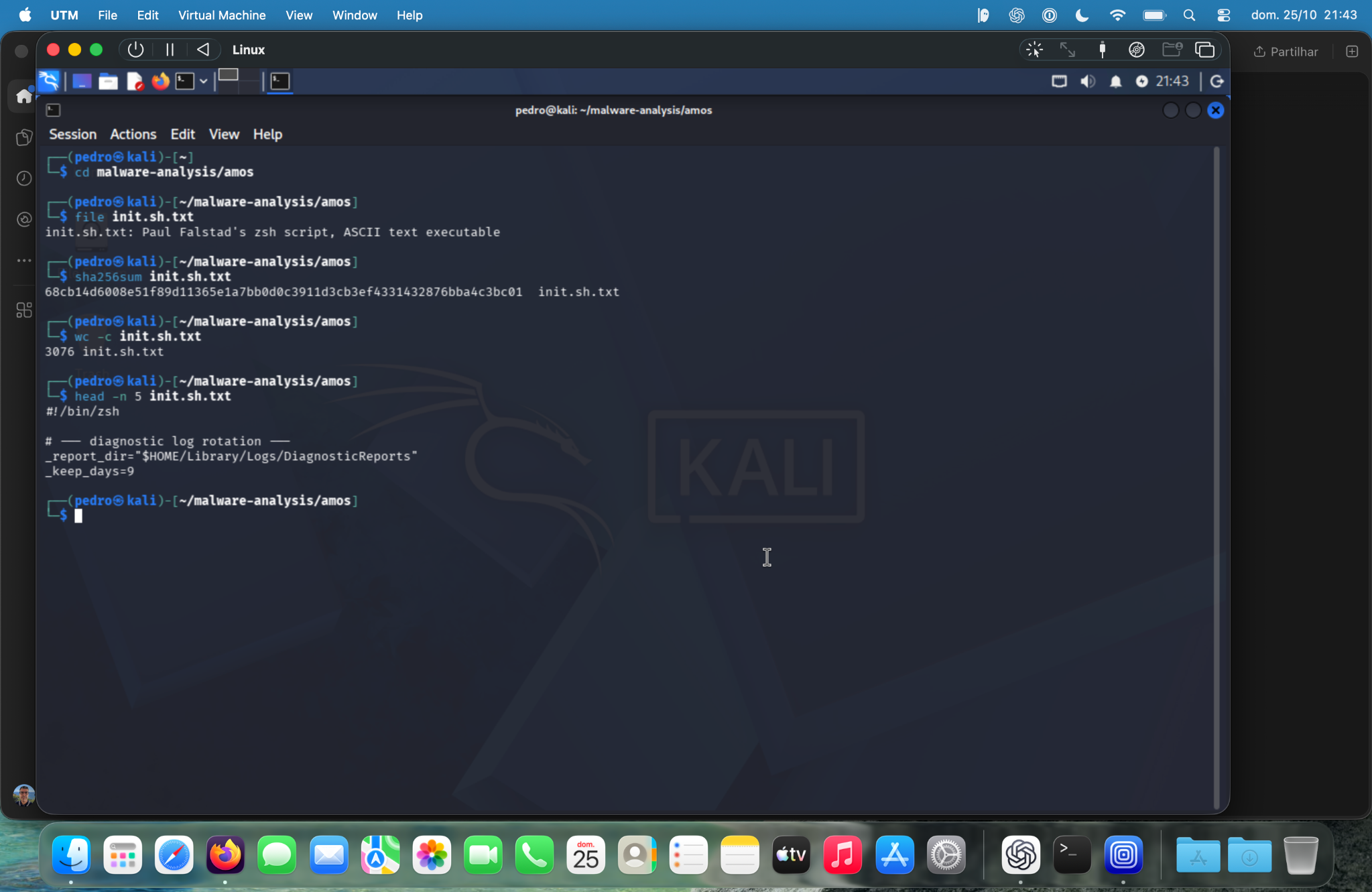
The “diagnostic log rotation” header disguised code that decrypted and launched another stage.
The indicators strongly resembled Atomic macOS Stealer (AMOS). Public research described similar distribution methods. I also inspected a related macOS executable, but couldn't verify it was the exact one that had run on my machine.
The investigation never established a definitive upload destination. Eventually, further analysis was producing fewer useful answers than practical recovery work.
Securing the computer—and my accounts
I erased the MacBook Air and reinstalled macOS from scratch. I wanted a fresh starting point, without restoring an entire system image or carrying over suspicious scripts and configurations.
Starting clean reduced my worry about hidden processes, but couldn't undo any earlier theft.
But reinstalling can't undo a theft or revoke copied credentials. I revoked all my SSH keys from GitHub, the only service where I used them. That addressed the private key I'd found among the collected files.
I can't claim every credential was stolen or that every other potentially exposed credential has been rotated. Recovery meant responding to possible exposure, rather than waiting for proof of abuse.
An unexpected sign-in attempt from Jakarta
On 26 October, my iPhone asked me to approve an Apple Account sign-in near Jakarta, Indonesia. I was in Belgium. I immediately selected Don't Allow.
Fortunately, I'd enabled two-factor authentication years earlier. That extra check was particularly valuable then.
This didn't prove a connection to the malware. The password could have been exposed elsewhere, and the location could have reflected a VPN. Still, the timing was concerning.
I changed my Apple Account password to a unique, randomly generated 60-character password. That length wasn't necessary—a shorter, sufficiently long random password would also be strong—but using a password manager made it easy.
Rethinking my email addresses
After roughly 20 years of registrations, newsletters and shopping, my Gmail address was widely known. I kept it, but separated email into three roles:
- Private email: Sensitive personal accounts, close friends and family.
- Work email: Professional communication and development services.
- Legacy Gmail: Shopping, subscriptions, everyday registrations and occasional contacts.
Existing contacts can still use my legacy address; my private address stays restricted.
Notifications stay on for private email and off for Legacy Gmail, which I check periodically. It's like two entrances: one for people and services needing my attention, another for the rest of the internet.
I changed my Apple Account's primary email and removed the legacy address from its sign-in addresses. I also updated an older iCloud address receiving spam and phishing. The Apple Account itself stayed the same, including its purchases and data.
Email addresses aren't passwords. This doesn't replace strong authentication, but it reduces noise and gives me another clue when a security message arrives in the wrong inbox.
The lesson I'll remember
The frustrating part is that I knew better. A convincing website, a prominent search result and a moment of impatience were enough.
Social engineering exploits ordinary behaviour. We get tired, trust familiar interfaces and take shortcuts to finish one last task before bed.
Never run Terminal commands in a rush. If I don't have time to understand what a command does—including what it downloads and executes—I shouldn't run it.
It can wait until tomorrow.
The minutes I thought I'd saved became hours of investigation, a clean reinstall, revoked SSH keys and account changes. I now separate two questions: is my computer clean, and are my accounts safe? Solving one doesn't solve the other.
That's a trade I'll try very hard never to make again.
If this happens to you
- Isolate the device: Disconnect it and stop entering credentials.
- Use another trusted device: Secure email, your password manager and account-recovery settings. An unlocked vault doesn't prove theft, but warrants review.
- Revoke exposed access: Address SSH keys, tokens, passwords and active sessions separately. Reinstalling won't invalidate them.
- Review and report: Check trusted devices and unfamiliar activity; report work-related exposure through the appropriate security process.
- Preserve evidence and rebuild: Keep safe records before wiping, where practical. Avoid restoring suspicious executables or configurations. No upload log doesn't mean no theft.
Technical notes
These are observations from my investigation, not proof that data was uploaded. The domains below are deliberately written as plain text, not clickable links.
Observed local artifacts (12 October 2026):
/private/tmp/77167/FileGrabber/ssh/id_ed25519— collected private key, potentially exposed./private/tmp/77167/FileGrabber/docker/config.json./private/tmp/77167/FileGrabber/zsh_historyandzshrc./private/tmp/.k57bvjuxnl— hidden second-stage file path observed locally and matched by recovered loader.- Hidden ZIP archive approximately 16 KB, with a number of empty category directories.
Observed domains (defanged):
apple-free-up-storage[.]com— fake support website.balladcompass11[.]com— first-stage and second-stage delivery infrastructure.willow-62[.]com— telemetry/C2-related endpoint found in decrypted first-stage code; whether it received the ZIP is unknown.
Research evidence:
init.sh.txt: 3,076-byte Zsh loader; SHA-25668cb14d6008e51f89d11365e1a7bb0d0c3911d3cb3ef4331432876bba4c3bc01.- Decrypted loader SHA-256
9f9a48fd0ec070e79b62a2a0f542f0060e955ed88b993b6ab61fe6547718d1ef(1,746 bytes). - Related, not verified incident-exact, universal Mach-O sample SHA-256
1b9ebec7a73d0a7c135f71904fef98602fa5ff49d137bb145608da207541c15b.
Sources and further reading
- Apple — Recognize and avoid phishing and social engineering
- Apple — If you think your Apple Account has been compromised
- Unit 42 — Atomic macOS (AMOS) Stealer Activity
The external research describes malware-family patterns. It does not establish which data, if any, left my MacBook Air.
Share this article